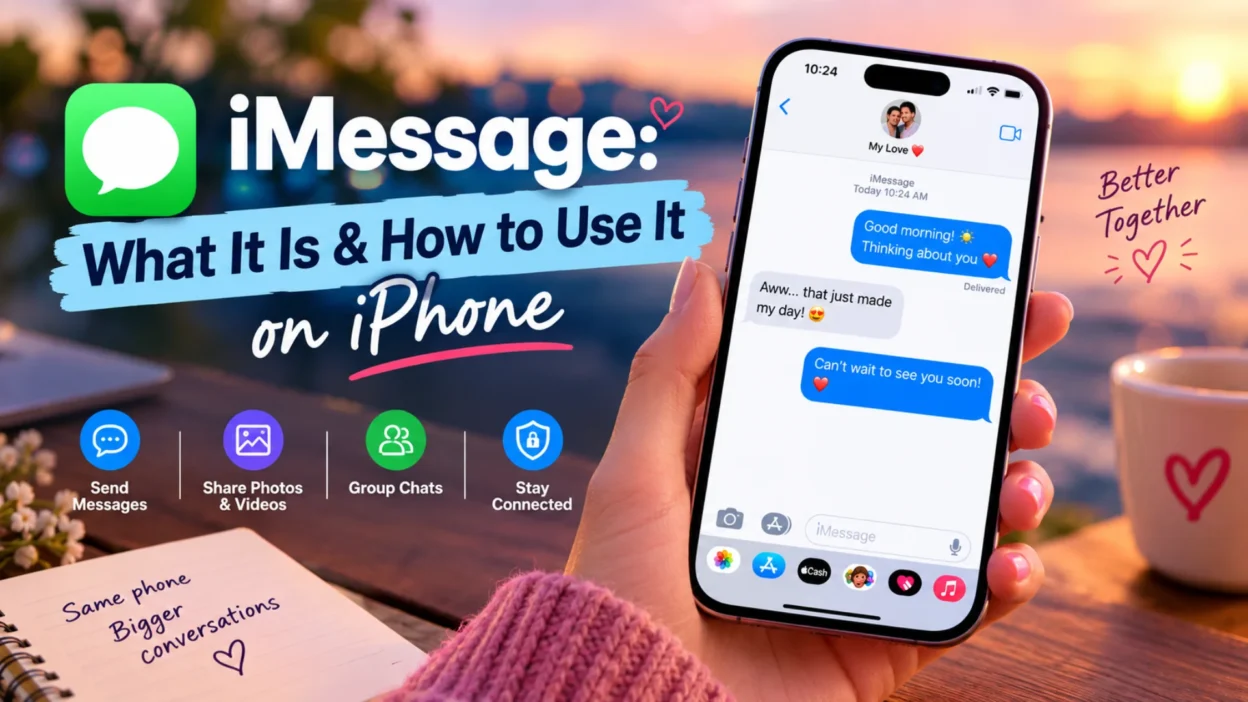
If you use an iPhone, you’ve almost certainly used iMessage without thinking much about it. Those blue bubbles that appear when you text other Apple users? That’s iMessage at work. Apple built this proprietary messaging service into the iPhone back in 2011, and it’s been the default way iPhone users communicate ever since.
iMessage isn’t just a text message with a fancy color. It runs on a completely separate platform that uses the internet, offering encryption, read receipts, high-quality media sharing, and features that SMS simply can’t match. This guide explains what iMessage is, how it works, how to set it up, and how to troubleshoot common problems.
What Is iMessage?
iMessage is a secure messaging service you can use on your iPhone, iPad, Mac, Apple Watch, or Apple Vision Pro. It sends messages over Wi-Fi or mobile data networks, not your carrier’s SMS system.
When you send a message to someone who also uses iMessage on an Apple device, the text appears in a blue bubble. This tells you immediately that you’re using iMessage rather than SMS or RCS. The blue bubble isn’t just aesthetic—it signals that your conversation is end-to-end encrypted, meaning no one, not even Apple, can read the messages while they travel between devices.
Apple designed iMessage for communication between Apple devices only. You can’t use it to message someone on an Android phone. When you text an Android user, your iPhone automatically falls back to SMS or RCS, and the bubbles turn green.
What Makes iMessage Different
End-to-End Encryption
The most significant difference between iMessage and SMS is encryption. Every iMessage is end-to-end encrypted from the moment it’s sent. Apple cannot decrypt the content of your conversations. This is a fundamental architectural choice, not an optional setting.
SMS messages, by contrast, carry no encryption at all. They travel over cellular networks in a format that carriers and potentially third parties can read. This is why the FBI and other security agencies have repeatedly advised people to use encrypted messaging platforms instead of SMS.
RCS on iPhone now supports end-to-end encryption in beta, but it’s not guaranteed. Encryption depends on whether both parties’ carriers support it, and it fails in group chats if even one person doesn’t meet the requirements.
Rich Features
iMessage supports a range of features that SMS cannot:
- Read receipts and typing indicators — You can see when someone has read your message and when they’re typing a reply
- High-resolution photos and videos — Media isn’t compressed the way it is with MMS
- Tapbacks — React to messages with hearts, thumbs up, laughter, and more
- Message effects — Send messages with animations like confetti or balloons
- Memoji and Animoji — Send animated versions of yourself
- Undo send and edit — Recall or edit messages within specific time windows
- Audio messages — Send voice recordings directly in conversations
No SMS Charges
Messages sent via iMessage don’t count against your SMS, MMS, or RCS allowances in your cellular plan. They use your data connection instead. If you’re on Wi-Fi, they don’t use cellular data at all.
How to Set Up iMessage on iPhone
Setting up iMessage takes just a few taps.
Step 1: Open the Settings app on your iPhone.
Step 2: Tap Apps, then tap Messages.
Step 3: Turn on iMessage.
Step 4: If you want to choose which phone numbers or email addresses you can be reached at, tap Send & Receive. Select the options you want to use.
Once iMessage is on, any messages you send to other Apple users will go through iMessage automatically. If iMessage isn’t available for any reason, your iPhone will fall back to SMS or RCS.
Syncing Across Apple Devices
If you want your iMessages to appear on all your Apple devices, you can enable Messages in iCloud. Go to Settings, tap your name, tap iCloud, then turn on Messages.
When Messages in iCloud is enabled, your conversations stay in sync across your iPhone, iPad, and Mac. If you delete a message on one device, it deletes on all of them.
You can also use Text Message Forwarding to receive SMS, MMS, and RCS messages on your other Apple devices. Go to Settings, Apps, Messages, then tap Text Message Forwarding and enable the devices you want.
How to Tell If You’re Using iMessage
Two clear indicators tell you whether you’re using iMessage.
Bubble color: Blue bubbles mean iMessage. Green bubbles mean SMS or RCS.
Send button color: When you’re typing a message, look at the send button. A blue send button means the message will be sent via iMessage. A green send button means it will go through SMS or RCS.
If you see green bubbles when texting another iPhone user, it means iMessage isn’t working on your device or theirs. Common causes include iMessage being turned off, a temporary service outage, or the recipient not having an Apple device.
Common iMessage Problems and Fixes
iMessage Won’t Activate
Some users encounter activation problems, particularly after updating to iOS 26 or setting up a new eSIM. The issue often stems from having an inactive SIM or eSIM with the same phone number as your active one.
The fix is to remove the inactive SIM. Go to Settings, Cellular, and check if you see two SIMs with the same phone number. Delete the inactive one. If it’s a physical SIM, remove it from the phone. If it’s an eSIM, tap Delete eSIM.
After removing the inactive SIM, go to Settings, Apps, Messages, Send & Receive, and tap your phone number to reactivate iMessage.
iMessage Not Working After eSIM Setup
If you set up an eSIM after the initial iPhone setup process, iMessage may not activate automatically. This is a known quirk in iOS 26.
The fix is simple: toggle iMessage off and back on. Go to Settings, Apps, Messages, turn iMessage off, wait a few seconds, then turn it back on. This forces the service to recognize your phone number from the newly activated eSIM.
You’ll see a “Waiting for Activation” message briefly. Once it disappears and the toggle stays green, iMessage should work properly.
Messages Sending from Email Instead of Phone Number
If recipients see your email address as the sender instead of your phone number, iMessage is using your Apple ID email rather than your number. To fix this, go to Settings, Apps, Messages, Send & Receive. Under “Start New Conversations From,” select your phone number.
iMessage and Privacy
Apple has built iMessage with privacy as a core principle. The service works so that Apple cannot decrypt the content of conversations between devices.
Apple does retain limited information about iMessage usage, such as whether your device is eligible for the service. It stores this data for up to 30 days. If you enable iCloud Backup or Messages in iCloud, your messages get backed up and encrypted in iCloud.
For users who need an extra layer of security, iMessage supports Contact Key Verification. This feature lets you verify that you’re messaging the person you intend to message, protecting against sophisticated impersonation attacks.
iMessage vs. RCS and SMS
Understanding where iMessage fits alongside the other messaging standards helps clarify when and why you use it.
SMS and MMS are the oldest standards. They work on every phone, regardless of carrier or operating system. They carry no encryption, have character limits, and compress media heavily.
RCS is the modern upgrade to SMS. It supports read receipts, typing indicators, and high-quality media. On iPhone, RCS messages appear in green bubbles. Apple’s RCS implementation now supports end-to-end encryption in beta, but only when both parties’ carriers support it and both devices meet the software requirements.
iMessage is Apple’s proprietary standard. It works only between Apple devices, always uses end-to-end encryption, and appears in blue bubbles. It doesn’t depend on carrier support for encryption or features.
The hierarchy is straightforward: you use iMessage when both parties have Apple devices and iMessage is enabled. If not, the conversation falls back to RCS if available, then to SMS if RCS isn’t supported.
FAQs
What is iMessage?
iMessage is Apple’s secure messaging service for iPhone, iPad, Mac, Apple Watch, and Apple Vision Pro. It sends messages over Wi-Fi or mobile data, supports end-to-end encryption, and appears in blue bubbles.
Is iMessage the same as texting?
No. iMessage is a separate service from SMS and RCS. When you text someone without an Apple device, your iPhone uses SMS or RCS instead, and the bubbles turn green.
Why are my messages green instead of blue?
Green bubbles mean your message went via SMS or RCS, not iMessage. This happens when the recipient doesn’t have an Apple device, iMessage is turned off on either device, or iMessage is temporarily unavailable.
How do I turn on iMessage?
Go to Settings, tap Apps, tap Messages, and turn on iMessage. If you want to choose which phone numbers or email addresses you can be reached at, tap Send & Receive.
Does iMessage cost money?
iMessage doesn’t count against your SMS or MMS allowance. It uses your data connection instead. If you’re on Wi-Fi, it doesn’t use cellular data at all.
Is iMessage encrypted?
Yes. iMessage is end-to-end encrypted, meaning Apple and third parties cannot read your messages while they travel between devices.
Why won’t iMessage activate on my iPhone?
Activation problems often stem from having an inactive SIM or eSIM with the same phone number as your active one. Go to Settings, Cellular, and delete any inactive SIMs showing the same number. Then reactivate iMessage in Settings, Apps, Messages, Send & Receive.
Can I use iMessage on Android?
No. iMessage is exclusive to Apple devices. Android users cannot send or receive iMessages. If you want to message an Android user, your iPhone uses SMS or RCS instead.
Conclusion
iMessage is more than just a texting app with blue bubbles. It’s a secure, feature-rich messaging platform that Apple built into the iPhone from the start. Its end-to-end encryption, rich media support, and seamless integration across Apple devices make it the preferred way for iPhone users to communicate with each other.
The distinction between iMessage, RCS, and SMS matters because each offers different levels of security and functionality. iMessage always encrypts. RCS encrypts only under specific conditions. SMS never encrypts. When you see a blue bubble, you’re using the most secure option available on an iPhone. When you see green, you’re on a standard that may not protect your messages.
Setting up iMessage takes seconds, and the benefits are immediate. If you’re an iPhone user and you haven’t checked your iMessage settings, it’s worth confirming that it’s turned on and that your phone number is selected for sending and receiving. That small step ensures you’re getting the most secure and feature-rich messaging experience your device can offer.

Hamid Mehmood is a passionate content creator dedicated to making words, messages, and online expressions easy to understand. He enjoys creating clear, helpful content that helps readers discover meanings and communicate with confidence.